Welcome back to The Zoho Report! In this episode, we're covering the July product update for Zoho Analytics, new email data synchronisation between Zoho CRM and Zoho Analytics, saved filters for portal users in Zoho CRM, workflow Connections in Zoho Bookings, and increased character limits for Zoho CRM module and field labels. Let's dive in.
1. Zoho Analytics: July 2026 Updates
Zoho Analytics has released its July 2026 product update, and it's a substantial one, spanning machine learning, integrations, and developer tools. Two additions stand out from the rest.
System Tags
You can now group reports and dashboards under built-in tags like Certified and Outdated, making it much easier for anyone browsing a busy workspace to see at a glance what's trusted and what's gone stale.
Forecasting in Pivot View
Forecasting has been available on charts for a while, but it's now available inside Pivot Views as well. You can view projected values alongside actuals directly in your pivot reports, rather than switching between a chart and a pivot to compare historical and forecast data.
Also in this release
- Time Series model in AutoML: Build no-code forecasting models from historical data to predict demand, sales, inventory, or revenue
- PMML import: Bring in machine learning models trained outside Zoho Analytics and apply them without retraining
- Two new business connectors: GreytHR and Cin7 Core
- Live Connect support: Real-time access to MongoDB and ClickHouse (Cloud Server) data without importing or duplicating it
- Additional field support for the Zoho Sprints and Facebook Ads connectors
Availability: Available now across Zoho Analytics.
2. Zoho Analytics: Email Data Synchronisation with Zoho CRM
Reporting on email performance has always meant leaving Zoho CRM to piece it together elsewhere. Zoho Analytics can now sync email data directly out of CRM, so you can analyse email engagement and template performance alongside the rest of your CRM reporting.
How it works
- When configuring your Zoho CRM integration, you can now select an Emails child module under supported modules such as Leads and Contacts, which brings through email activity and engagement data: opens, clicks, bounces, template used, and more
- A standalone Email Templates module is also available if you want to report on template performance directly
- Once email sync is enabled, all supported fields are selected automatically. Email data doesn't support custom fields, so there's no manual field mapping required
Important
This only covers emails sent from within Zoho CRM. If your inbox is synced via IMAP rather than sent through CRM, this feature won't pick that email data up, it's purely CRM-generated email activity.
If your synchronisation frequency is set to Instant, email data currently still syncs every three hours rather than instantly. Zoho says true instant sync for email data is coming in a future update; all other sync frequencies work as expected.
Availability: Available now across all Zoho Analytics editions. If you'd like to use this, reach out via your assigned Enterprise Support email address.
3. Zoho CRM: Saved Filters for Portal Users
Standard CRM users have long been able to save frequently used filters on a module view, switching between filtered views without re-applying criteria each time. Portal users didn't have that option, every visit meant rebuilding the same filter conditions from scratch.
What's changed:
- Before: Portal users had to apply filters manually on every visit, with no way to save or reuse them
- Now: Portal users can save and reuse filter conditions within a module, just like standard CRM users
Filter limits by edition
Professional Edition: up to 5 saved filters per module
Enterprise or Ultimate Edition: up to 10 saved filters per module
Availability: Available now for all data centres.
4. Zoho Bookings: Connections
Wiring Zoho Bookings up to other Zoho apps through workflows previously meant setting up authentication over and over for each new workflow. Zoho Bookings' new Connections feature fixes that by letting you authorise a supported Zoho service once and reuse it across multiple workflows.
How it works
- Authorise a supported Zoho service once from a central location in Zoho Bookings
- Reuse that authorised connection across as many booking workflows as you need, without re-authenticating each time
- Use connections inside workflows triggered by booking events: appointment creation, updates, cancellations, and no-shows
In this current release Zoho Cliq, Zoho Recruit and Zoho Desk are supported, however Zoho has stated that more services will be added in the coming months.
How to enable it: Head to Admin Center > Developer Hub > Connections, select a supported service, click Connect, and review and authorise the requested permissions.
Availability: Premium plan.
5. Zoho CRM: Increased character limits for field and module labels
Organisations using business-specific terminology have often had to shorten or abbreviate module and field labels to fit Zoho CRM's character limits. Zoho is increasing those limits to allow more descriptive naming.
What's changing
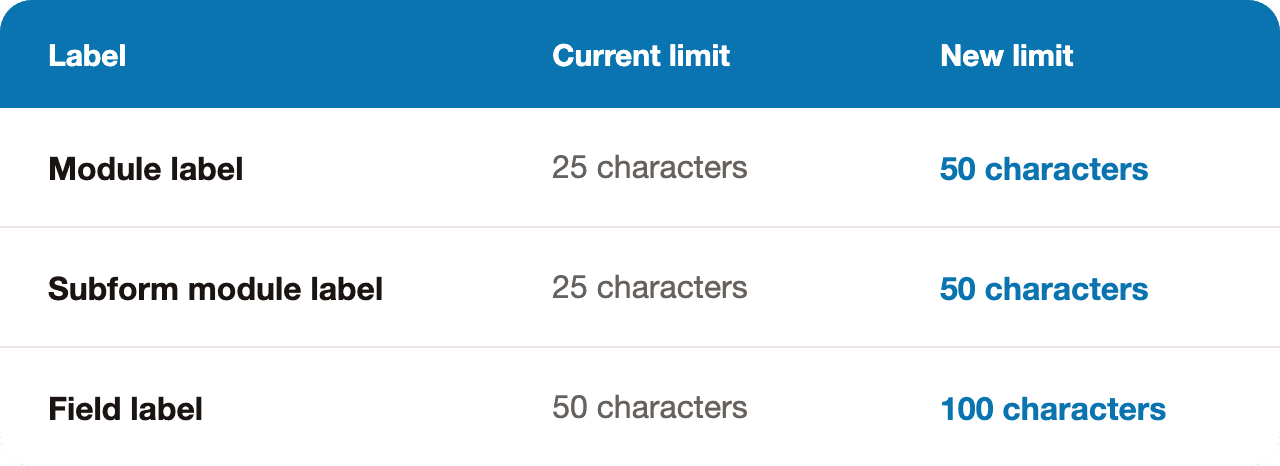
API compatibility: The change is platform-wide and isn't tied to a specific API version. Once live, the new limits apply across all supported API versions for any endpoint that creates or updates labels.
Action item: If you have integrations that validate or enforce the existing label length limits, review and update those validations to accommodate the new limits.
Availability: Rolling out in phases across all Zoho CRM data centres over the coming days.
Stay Updated
That's it for Episode 19 of The Zoho Report! We hope these updates help you work smarter with your Zoho applications.
Want these updates delivered directly? Watch Episode 19 on YouTube or subscribe to our channel for regular Zoho updates.